Denise Fortner, MBCP

Denise Fortner, MBCP
Showing posts with label Disaster Recovery. Show all posts

Saturday, February 21, 2015

Blizzard 2015 business continuity tips


The blizzard of 2015 is in full swing, so you can't prepare for it now, but you can start preparing for the next one when you evaluate your company's response to the blizzard:

Blizzard 2015 business continuity tips

Healthcare Info Security put together a great article to help you do just that (including some quotes from DRI's Al Berman).

The article's tips revolve around 3 areas:

  • Personnel Issues
  • Reviewing Backup Processes
  • Maintaining Priorities
These 3 areas will be any company's focus in a weather-related disaster. 

The steps you can take to assure you're ready to respond to a blizzard can often be applied to a tornado, hurricane, flood, etc. 

In some cases, we get a little advance warning that the weather may produce a disaster, and it's imperative the business continuity professional is prepared to take advantage of every minute of that advance warning.


Wednesday, February 18, 2015

Disaster recovery isn't dead: 7 things to cover in your DR plan


Business Continuity never replaced DR, it absorbed it into the BC Program. Here's a great reminder of 7 things that should be in your DR plan (from CSO):

7 critical things to cover in your disaster recovery plan


Tuesday, February 17, 2015

What's in an IT Disaster Recovery plan template?

SunGard Availability Services has an article that might be useful if you're working on IT DR plans:

Whats in an IT DR plan template

This is a good article and very helpful. It's also a perfect example of what a "plan template" means: it shows you the headings for the plan, the questions you need to answer, and what type of data needs to be included. It's not a file you download and fill in the blanks. 

Any guide that purports to be a quick fill-in-the-blanks template is a fraud: it's either so high level that it's worth nothing, or it's a sales pitch in disguise. SunGard Availability Services' template is exactly the kind of thing you want when you're looking for a template: some key pointers, a list of the things you must include (which is incomplete because it can't address every business in every situation), and some advice on the headings you want to use and in what order.


Wednesday, February 11, 2015

Emergency notifications - many things to consider (Part 1)


Emergency notifications are an area that every organization needs to master before it is needed. Solutions basically fall into 3 groups:
  • Call tree or cascade system
  • A 1-800 hotline number for employees to call
  • An automated Emergency Notification System (ENS)
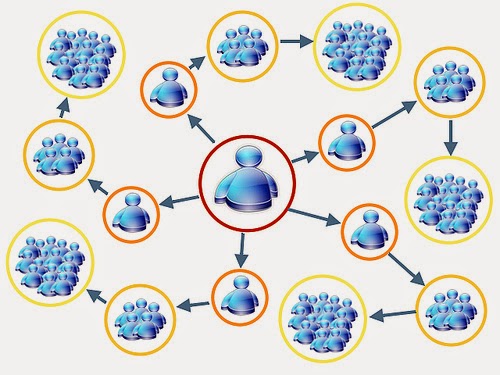
Call trees, I've observed, are typically organized in one of two ways. Using a department of 30 people as an example, the call tree would usually be organized one of the following ways:
  1. The department manager calls all 30 people, noting anyone they are unable to get in touch with.
  2. The department manager calls employee #1, who calls employee #2, who calls employee #3, and so on until employee #30 is contacted, who then calls the department manager to confirm all notifications were made. If employee #1 is unable to reach employee #2, they are to call employee #3, and continue calling employees until the next person is reached. The is also called a cascade system, or "call stick" since it resembles a stick more than a tree.
Call tree procedures often lack the depth needed in the event of an actual incident. Even if procedures are sufficiently detailed, both methods have benefits and pitfalls, as illustrated in the two tables below.


With either of these options, notifications will take a long time. Both methods are open to human error. 

Both methods have the problem of keeping the call trees updated and distributed, which may be feasible for an organization with 20 people, but not for an organization with hundreds or thousands. Both methods have the issue of how you are generating the call trees and storing information: is this information being pulled from he human resources / payroll data, or are departments expected to maintain their own call trees?

I've talked with many defenders of call trees, who believe if the procedures are detailed enough, they will be successful when needed.

I have to disagree. Getting employees to keep their contact information current in human resources / payroll data is difficult, getting employees to maintain current contact information in two systems in nearly impossible. Someone has to enter new employees and take out employees no longer with the company. It is almost certain that at any given time, the information in the two systems will differ. 

As business continuity professionals, we have to take into consideration the opportunity (and great potential) for human error in the middle of an incident or disaster.

The time it takes to reach employees can be critical if, for example, your company is trying to verify no one was in the building at midnight when a disaster happened.

I've never encountered, in any company, someone in the legal department who would approve of giving out employee contact information past the management level. It's simply a breach of confidentiality, and something the company has no right to do without documented consent from employees.

So why are so many companies using call trees? I think it's often a case where the business continuity professional is given direction to use call trees as a notification strategy, often  by upper management. The business continuity professional distributes the call trees, and no one objects . . . until something goes wrong. Upper management sometimes just fails to realize that confidential information is being shared not only with management but other employees, possibly even the legal department doesn't realize what is happening, and no one considers the risks and implications of this strategy.

Some of the best Human Resources personnel I've known have refused to grant Business Continuity any access to employee contact information, because of the confidentiality involved and because of the risks in granting access to systems often used for payroll. Obviously, that is a problem that impacts call trees and other methods of employee notification.

I can't recommend call trees to any organization I work with other than small businesses, and then the confidentiality issue still has to be addressed. 

Business continuity professionals need to educate upper management about the risks and short-comings of call trees, and steer them in another direction.

I'll discuss other options for notification tomorrow. Thanks for reading.


Thursday, January 29, 2015

Ready.gov - Testing & Exercises

Ready.gov Testing and Exercises

Ready.gov has put together a list of the benefits of testing. They also did a fantastic job of discussing the use of the term 'exercising' vs. 'testing':

Testing the Plan

When you hear the word “testing,” you probably think about a pass/fail evaluation. You may find that there are parts of your preparedness program that will not work in practice. Consider a recovery strategy that requires relocating to another facility and configuring equipment at that facility. Can equipment at the alternate facility be configured in time to meet the planned recovery time objective? Can alarm systems be heard and understood throughout the building to warn all employees to take protective action? Can members of emergency response or business continuity teams be alerted to respond in the middle of the night? Testing is necessary to determine whether or not the various parts of the preparedness program will work.

Exercises

When you think about exercises, physical fitness to improve strength, flexibility and overall health comes to mind. Exercising the preparedness program helps to improve the overall strength of the preparedness program and the ability of team members to perform their roles and to carry out their responsibilities. There are several different types of exercises that can help you to evaluate your program and its capability to protect your employees, facilities, business operations, and the environment

I know some people have become adverse to the word 'testing', feeling that if the test isn't 100% successful, it reflects poorly, like a failure. Personally, I use the words interchangeably. I think one key to a successful exercise program is setting the expectation with management that it is designed to find the areas that need improvement, and there will always be areas that need improvement.

In my opinion, if an organization is testing year after year and they're finding no weaknesses in the continuity plan, then they need to look at changing the testing scenario. Recovering the IT environment isn't proof of business continuity, it's one component. Some  organizations may over-focus on IT recovery/resilience, at the expense of other plan components such as:

  • Command and control procedures
  • Communications with employees, shareholders and the media (employees may have been told not to speak to the media if an event occurs, but have you updated that direction to include not posting to any social media or taking unauthorized pictures during a recovery?)
  • Alternate facility for employees to work in, both locally and farther away in the case of a large incident
  • Staffing, cross-training and the need for alternate staff
  • Managing customer communications and expectations
Testing is such an important component to the business continuity program. Once it's become an integrated part of the program, it's important to continuously reevaluate the scope and scenario of your exercises.

Wednesday, February 5, 2014

Wednesday Wisdom: For the small business owner


I wish I could broadcast this out to every small business owner: you can't afford to wait! Having a disaster recovery and business continuity plan isn't just an option., it can be the difference in your business surviving or failing. See the post from Monday (February 3) for more on the subject.

Sunday, February 2, 2014

The need for disaster recovery isn't dead

TheGuardian.com ran an article in their Small Business Money Blog about the state of disaster recovery and business continuity planning in small and medium sized businesses:

Business continuity plans: a position for recovery

A few key take-aways:

Small and medium sized business that fail to create a disaster recovery or business continuity plan are more likely to close in the first two years of operating.

"In the Aviva survey, half of SME owners questioned revealed they had no BCP in place, and a further 16% said they didn't think they needed one. Only 36% of respondents were even aware of BCPs and what they were for, while, worryingly, only a quarter (28%) of business owners said they had a BCP in place. The remaining 6% didn't know if they had a BCP or not."

I think this article demonstrates that the need for disaster recovery isn't dead. Big businesses may tout that they have mirroring or use the Cloud and have business resiliency, but there is still a lot that needs to be done ot reach small and medium sized businesses.

I think there's been a trend of some people believing that as technology improves and more business functions are automated, the role of the business continuity professional is diminishing, but that just isn't true. IT continuity isn't business continuity.